GDPR data minimisation: your practical implementation guide

Under Article 5(1)(c) of the GDPR, personal data must be adequate, relevant and limited to what is necessary for the specified purpose. That single sentence carries real operational weight: it means you cannot collect data speculatively, hold it indefinitely, or justify it with a vague "it might be useful later" rationale.
"Controllers must be able to demonstrate they hold only the minimum information required for the specified purpose — adequacy, relevance and limitation are not aspirational; they are the legal baseline." — ICO, Principle (c): Data minimisation
Three actions you can take today:
- Clarify your purpose for each dataset before touching a single field.
- Remove a non-essential field from your highest-traffic form or intake process.
- Set or review retention for that dataset so data is deleted when it has served its purpose.
Key takeaways
Data minimisation under Article 5(1)(c) is a continuous, documented practice: define purpose first, then collect only what that purpose requires, enforce it technically, and produce evidence that you did.
| Point | Details |
|---|---|
| Define purpose before collecting | Every data field needs a named, specific purpose before collection begins — "future use" is not a valid basis. |
| Apply the three tests | Adequate, relevant, and limited are distinct tests; failing any one of them means the processing is non-compliant. |
| Enforce minimisation technically | Default settings, pseudonymisation, and automated deletion rules make minimisation repeatable, not just aspirational. |
| Document every decision | ROPA entries, retention schedules, deletion logs, and DPIA outcomes are the evidence regulators and auditors expect to see. |
| ShieldIQ automates the evidence trail | ShieldIQ maps automated assessments, policy templates, and evidence exports directly to the minimisation checklist, reducing manual overhead for EU SMEs. |
Table of Contents
- What does 'adequate, relevant and limited' actually mean?
- How do you decide whether a data item is truly necessary?
- A practical checklist for implementing data minimisation
- When are you processing too much — or too little?
- How do you demonstrate compliance to auditors and regulators?
- Technical and organisational measures: building minimisation into your systems
- How automation and a GRC platform make minimisation demonstrable
- Practical trade-offs and lessons from real implementations
- ShieldIQ makes minimisation audit-ready for EU SMEs
- Sources
What does 'adequate, relevant and limited' actually mean?
The three tests in Article 5(1)(c) are distinct, and conflating them is a common mistake.
Adequate means you collect enough data to fulfil the purpose. If you are processing a transaction, you need a delivery address. Stripping that out to appear minimal would actually break the purpose, which is equally non-compliant.
Relevant means there is a rational, direct link between each data item and the stated purpose. Collecting a job applicant's marital status for a software engineering role fails this test immediately.
Limited to what is necessary is the proportionality test. Even where data is relevant, you should ask whether a less intrusive alternative achieves the same outcome. An age range (18–24, 25–34) often serves a marketing purpose just as well as a full date of birth.
Recitals 39 and 78 of the GDPR reinforce this: personal data should be processed only if the purpose cannot reasonably be fulfilled by other means. Controllers should implement data-protection-by-design principles from the outset of system development.
The European Commission's guidance goes further, advising that anonymous data should be preferred wherever possible, and that default settings should limit the amount, extent and storage period of personal data from day one.
Special-category data (health, biometric, ethnic origin, political opinion and similar) attracts a higher proportionality threshold. The necessity test is stricter, the legal basis requirements are more demanding, and a Data Protection Impact Assessment (DPIA) is typically required before processing begins.
Practical examples help ground these tests:
- A recruitment form needs name, contact details, CV and right-to-work confirmation. It does not need date of birth, gender, or a photograph unless the role legally requires them.
- A marketing newsletter signup needs an email address and, if segmentation is genuinely used, a country. It does not need a phone number, job title, or company size unless those fields directly drive the marketing logic.
- A transaction record needs payment confirmation, amount, and delivery address for the statutory retention period. It does not need the full card number or CVV beyond the moment of authorisation.
How do you decide whether a data item is truly necessary?
Apply these four questions to every field before you collect it, and document your answers.
- Purpose specificity: Can you name the exact processing purpose this field serves? If the answer is "general business intelligence" or "future use," the field fails.
- Legal basis: Which lawful basis under Article 6 (or Article 9 for special categories) covers this item? If you cannot identify one, stop collecting.
- Usage frequency: Is this field actually read, used in logic, or surfaced in outputs? Fields that sit in a database untouched for months are almost certainly unnecessary.
- Alternatives: Could a less privacy-intrusive alternative achieve the same outcome? If yes, use the alternative.
A simple decision flow for each field:
- Keep if it is necessary, used, and covered by a clear legal basis.
- Make optional if it is useful but not required for the core purpose, and the user can meaningfully consent to providing it.
- Anonymise or aggregate if the purpose is analytical and individual identification is not needed.
- Remove if it fails the purpose, relevance, or necessity test.
Borderline cases are where most teams get stuck. A full date of birth is necessary for age-restricted services or regulated identity verification; an age range is sufficient for most marketing segmentation. A full IP address may be necessary for security logging but not for basic analytics, where a truncated or hashed version serves the purpose. Device identifiers are often collected by default in analytics SDKs but are rarely necessary for product improvement; a session token or anonymised event ID usually suffices.
A practical checklist for implementing data minimisation
Treat this as a living document, not a one-time exercise. Assign an owner and a cadence to each item.
- Map your data. Conduct a data audit across all systems, forms, databases, and third-party integrations. Use a data classification approach to label what you hold, where it lives, and who can access it.
- Map purpose and legal basis. For each data category, record the specific processing purpose and the Article 6 (or Article 9) legal basis. This becomes the foundation of your Record of Processing Activities (ROPA).
- Remove or optionalise fields. Review every intake form and API payload. Remove fields that fail the necessity test; make genuinely optional fields non-mandatory in your UI.
- Configure default settings. Set forms, CRMs, and analytics tools to collect the minimum by default. Do not rely on users to opt out of data collection; build minimisation into the default state.
- Apply access controls. Restrict access to personal data on a least-privilege basis. Staff should access only the data their role requires, and access logs should be retained.
- Automate retention and deletion. Define a retention period for each data category and automate deletion or anonymisation at the end of that period. Include backups and test environments in scope.
- Review processor and supplier contracts. Confirm that Data Processing Agreements (DPAs) with third parties include clauses requiring them to delete data on instruction and provide evidence of deletion.
The table below maps common data categories to suggested retention actions. These are illustrative; your legal, accounting, or regulatory obligations may require longer retention in specific cases.
Pro Tip: For SMEs starting out, two quick wins deliver immediate risk reduction: remove the phone number field from your newsletter signup form, and switch your web analytics to anonymise IP addresses by default. Both changes take under an hour and visibly demonstrate minimisation intent.
For ROPA entries, record the data category, purpose, legal basis, recipients, retention rule, and the technical measures applied. Retention schedule descriptors should sit alongside each ROPA entry so auditors can trace the rule to the record without hunting across separate documents.
When are you processing too much — or too little?
Over-collection is the more common failure, but under-collection creates its own compliance and operational risks.
Red flags for over-collection:
- Forms with more than five to eight fields for a simple purpose (newsletter, enquiry, event registration).
- "Notes" or "comments" fields with no defined scope, capturing free-text personal data without a clear purpose.
- Backups and archived copies that are never subject to deletion workflows, effectively making data immortal.
- Analytics or CRM tools collecting device identifiers, precise location, or behavioural data by default, with no review of whether that granularity is necessary.
- Data held "just in case" for a future purpose that has not been specified or given a legal basis.
Red flags for under-collection:
- Identity verification processes that collect insufficient data to meet regulated KYC (Know Your Customer) obligations, creating both a compliance gap and an operational risk.
- Consent records that lack a timestamp, version of the privacy notice shown, or the mechanism through which consent was given, making it impossible to demonstrate valid consent.
- Incident logs that are too sparse to support a meaningful investigation or regulatory notification.
Over-collection scenario: A professional services firm collects job title, company size, LinkedIn profile URL, and phone number on a contact form whose sole purpose is to send a monthly newsletter. Remediation: remove all fields except email address and, if segmentation is used, sector. Retain a record of the decision and the date fields were removed.
Under-collection scenario: A fintech startup collects only an email address and a self-declared name during onboarding, with no identity document or date of birth, to meet AML obligations. Remediation: identify the minimum identity data required by the applicable regulation, add those fields with a clear Article 6(1)(c) legal basis (legal obligation), and document the necessity decision in the ROPA.
The ICO is explicit that minimisation must preserve adequacy: reducing data to the point where you cannot fulfil the purpose or meet a regulatory obligation is not compliant minimisation.
How do you demonstrate compliance to auditors and regulators?
Accountability under Article 5(2) requires you to demonstrate compliance, not merely assert it. The following artefacts form the evidential backbone of any minimisation audit.
- ROPA entries for every processing activity, capturing: purpose, data categories, legal basis, recipients, retention rule, and technical and organisational measures. Build your ROPA systematically so each entry links directly to the retention schedule.
- Retention schedule listing each data category, the retention period, the trigger for deletion, and the deletion method.
- Deletion logs confirming that data was deleted or anonymised on schedule, including backups and test copies.
- DPIA outcomes for high-risk processing activities, documenting the necessity and proportionality assessment and any residual risks.
- Access control records showing who has access to which data categories, when access was granted, and when it was reviewed.
- Processor contracts and DPA clauses confirming that third parties are bound by equivalent minimisation and deletion obligations.
For audit cadence, a quarterly review of ROPA entries and a bi-annual deletion log reconciliation is a workable baseline for most SMEs. Simple metrics to track continuous compliance include: the percentage of data categories with a documented retention rule, the number of fields removed or anonymised in the last quarter, and the number of processor contracts reviewed for DPA adequacy.
Technical and organisational measures: building minimisation into your systems
Privacy by design is not a policy statement; it is a configuration choice made in every system you build or procure. The EDPB guidelines on data protection by design and by default set out the expectation that controllers apply technical and organisational measures to enforce minimisation from the outset.
Technical patterns to implement:
- Pseudonymisation: Replace direct identifiers with tokens or hashed values in analytics, testing, and reporting pipelines. The original mapping table is held separately with restricted access.
- Tokenisation: For payment data, replace card numbers with tokens immediately after authorisation. The token is useless outside the payment processor's vault.
- Schema minimisation: When designing or reviewing a database schema, remove columns that have no documented purpose. Unused columns are a liability, not a reserve.
- Field-level encryption: Encrypt sensitive fields (health data, financial data) at rest, separate from the encryption of the storage layer itself, so access is controlled at the field level.
- Minimise telemetry and analytics: Configure analytics platforms (such as Matomo or server-side Google Analytics 4 with IP anonymisation enabled) to collect session-level data rather than user-level data where the purpose permits.
- Minimise personal data in backups and test environments: Anonymise or mask personal data before it enters test or development environments. Backups should be subject to the same retention rules as live data.
For web forms, audit every field on every form annually. Remove pre-ticked boxes and optional fields that are rarely completed. For CRMs, review the default fields that are populated automatically by integrations and disable those not actively used. For marketing platforms, confirm that suppression lists, unsubscribe records, and inactive contact archives are subject to deletion schedules.
Pro Tip: Before each product release or form change, run a five-minute QA check: create a test account, submit the form, and verify in the database that only the expected fields are populated. Then confirm that a staged deletion job removes the test record within the expected window. This takes minutes and catches configuration drift before it becomes a compliance issue.
How automation and a GRC platform make minimisation demonstrable
Manual tracking of data categories, retention rules, and deletion logs across multiple systems is where minimisation programmes typically break down. A structured, automated workflow closes that gap.
- Map and assess. Use automated data discovery and classification tools to build an inventory of personal data across systems. Flag data categories with no documented purpose or retention rule.
- Update policies. Generate or update retention schedules and ROPA entries based on the inventory. Assign owners to each data category.
- Automate retention and deletion rules. Configure deletion or anonymisation jobs triggered by the retention schedule. Log each execution with a timestamp and confirmation of scope.
- Schedule audits and export evidence. Run quarterly automated assessments against the minimisation checklist. Export audit-ready reports showing retention compliance, field counts, and deletion log summaries.
A platform like ShieldIQ maps directly to this workflow: automated assessments identify gaps in your data inventory, policy templates accelerate ROPA and retention schedule creation, and evidence exports give you the audit trail regulators expect. For organisations managing multiple frameworks alongside GDPR, a single GRC platform avoids the duplication of maintaining separate evidence sets for each obligation.
Pro Tip: When contracting with processors, insist on a specific clause requiring them to provide written confirmation of deletion within 30 days of contract termination, including confirmation that backups have been purged. Without this, your deletion obligations are practically unenforceable at the processor level.
Practical trade-offs and lessons from real implementations
The gap between a minimisation policy and a minimisation programme is wider than most teams expect. A few observations from compliance implementations that recur across organisations of all sizes.
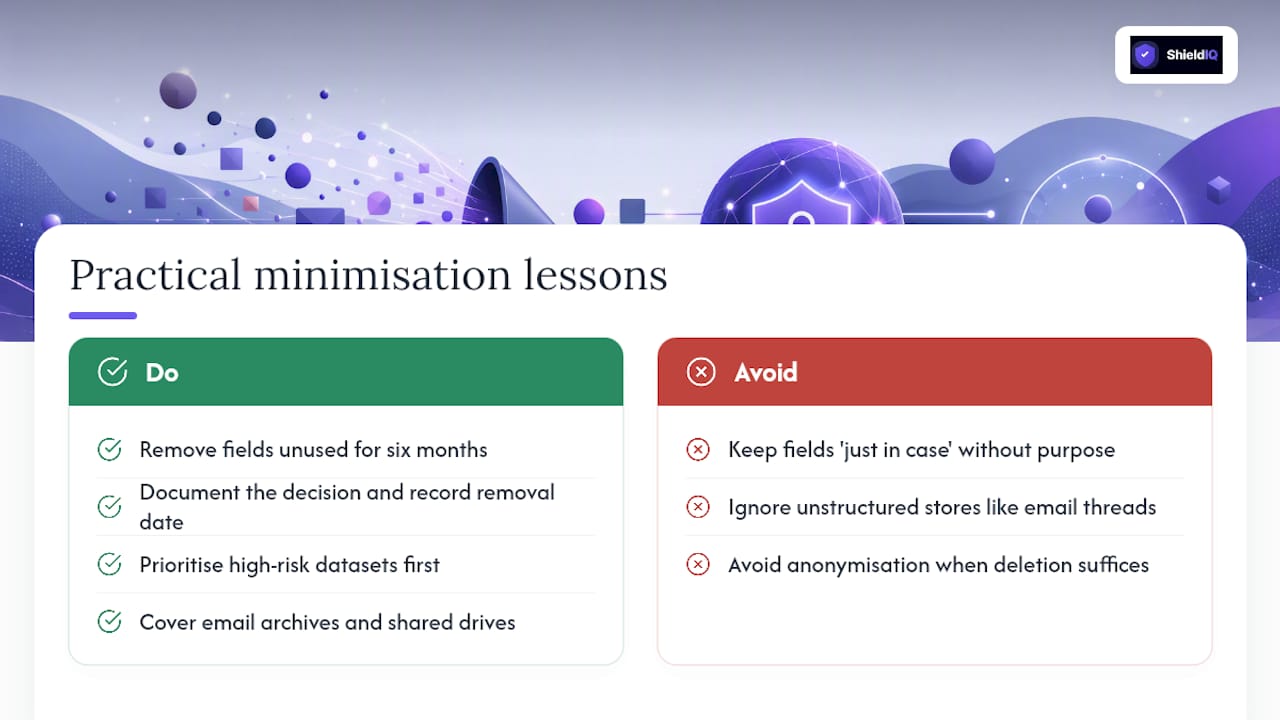
The most common trade-off is risk versus utility. Teams resist removing fields because "the sales team might need it one day." The pragmatic answer is to document the decision: if the field has not been used in six months and no specific future purpose is documented, remove it and record the removal date. That record is itself evidence of accountability.
Anonymisation versus retention is the other persistent tension. Anonymising data properly, so that re-identification is not reasonably possible, takes engineering effort. For many SMEs, the faster path is deletion rather than anonymisation, particularly for marketing and analytics data where the analytical value diminishes quickly. Reserve anonymisation for datasets where longitudinal analysis genuinely requires it.
Removing the unused fields, updating the ROPA, and documenting the decision took half a day. The result was a cleaner system, a shorter subject access response process, and a demonstrable minimisation action for the next audit.
A recurring audit gap: organisations that have deletion rules for their primary database but no equivalent process for email archives, shared drives, and collaboration tools. Personal data in an email thread or a shared spreadsheet is still personal data. Extending minimisation to unstructured data stores is harder, but ignoring them leaves a visible gap that auditors consistently flag.
For teams with limited capacity, prioritise high-risk datasets first: health data, financial data, children's data, and any data subject to a DPIA. High-exposure flows, such as marketing databases and third-party integrations, come next. Low-volume internal records can follow once the high-risk categories are under control.
ShieldIQ makes minimisation audit-ready for EU SMEs
Compliance teams that have worked through the checklist above know the bottleneck: it is not understanding what to do, it is generating the evidence that you did it, consistently, across every system and every quarter.
ShieldIQ's GRC platform automates the tasks that consume the most time: data mapping and gap assessment, ROPA and retention schedule creation using AI-generated policy templates, automated deletion workflow tracking, and evidence export for audits. For SMEs without a dedicated DPO or compliance team, that means audit-ready documentation without the overhead of building it manually. The platform covers GDPR alongside NIS2, ISO 27001, and other frameworks, so minimisation evidence sits in the same audit trail as your broader security controls.
If you want to see where your minimisation programme stands today, book a ShieldIQ assessment or explore the ISO 27701 privacy management module to see how privacy controls map to your existing obligations.
Sources
The legal and operational claims in this article are grounded in the following primary references. Consult them directly for the authoritative text and the most current guidance.
- EDPB guidelines on data protection by design and by default
- Principles of GDPR | European Commission
- Principle (c): Data minimisation | ICO
This article is general information, not a substitute for advice from a qualified lawyer. Consult a qualified legal professional about your own circumstances before acting on anything here.