SOC 2 automation for IT teams: a practical guide

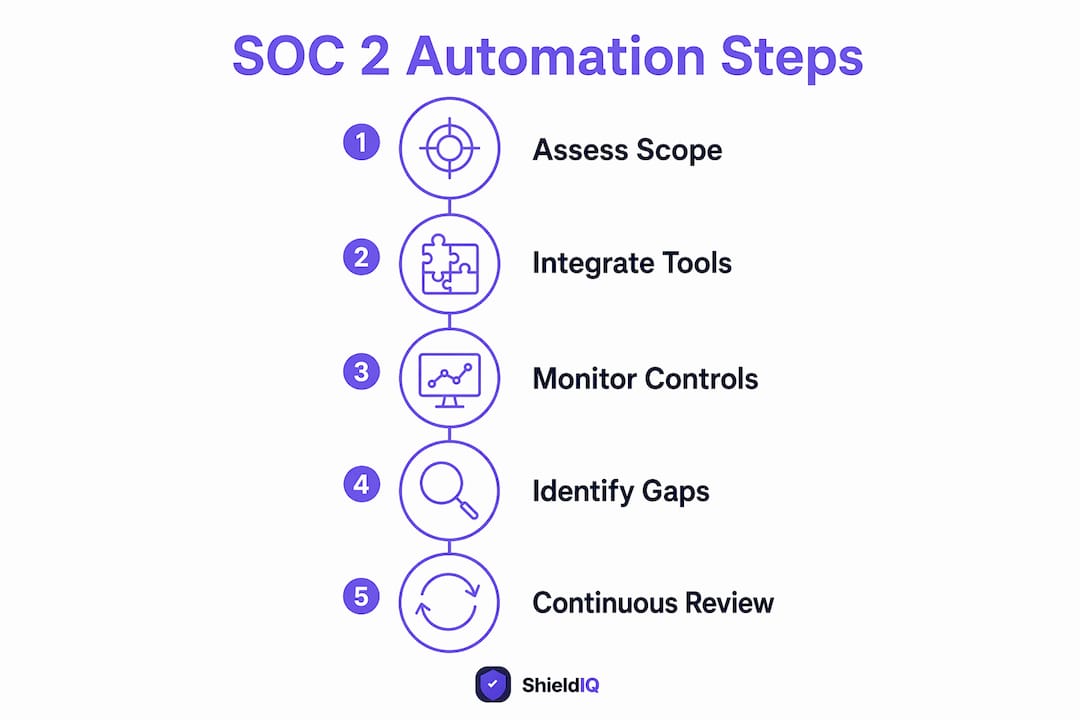
SOC 2 automation is the practice of using integration-based tooling to collect evidence, monitor controls, and flag gaps continuously, keeping your organisation audit-ready between formal audits rather than scrambling every twelve months. The AICPA still requires an independent CPA attestation to issue a SOC 2 report, so automation does not replace your auditor. What it does replace is the manual evidence chase. The recommendation here is direct: adopt automation to remove that annual scramble, but pair it with named process owners and governance from day one. ShieldIQ is one platform built specifically to deliver this for UK SMEs, combining automated evidence collection with optional advisory support.
Table of Contents
-
What features should you look for in SOC 2 automation tools?
-
How to roll out SOC 2 automation: phases, timeline, and costs
-
How do you keep your programme audit-ready after the first report?
What does SOC 2 automation actually do?
SOC 2 compliance automation centres on four core functions: automated evidence collection via API pulls, continuous control monitoring, automated gap and risk identification, and audit preparation into auditor-ready export formats. Each function maps directly to the technical controls your auditor will test.
Automated evidence collection pulls data from your existing systems through API integrations. Here is how common integration types map to auditor expectations:
-
Identity provider (IdP) integrations (Okta, Azure AD, Google Workspace): prove MFA enforcement, access provisioning and deprovisioning, and privileged account reviews.
-
Cloud account integrations (AWS, Azure, GCP): prove encryption at rest and in transit, logging configuration, and infrastructure change records.
-
Ticketing system integrations (Jira, ServiceNow, GitHub): prove change management procedures, incident response timelines, and approval workflows.
-
HR system integrations (BambooHR, Personio, HiBob): prove background check completion, security training records, and offboarding execution.
Continuous control monitoring runs checks against these integrations on a scheduled or near-real-time basis, alerting you when a control drifts out of compliance, for example when a new admin account is created without MFA.
Automated gap and risk identification compares your current control state against the SOC 2 Trust Services Criteria and surfaces missing or weak controls before your auditor does. This is particularly useful during the readiness phase, and it overlaps with the kind of gap analysis that applies across multiple frameworks.
The boundaries matter. Automation cannot define your scope, write your system description, conduct staff interviews, or issue the attestation. Those tasks require human judgement and, in the case of attestation, an independent CPA licensed under AICPA standards.
The business case: benefits and return on investment
The primary benefit of continuous compliance automation is not the first audit. It is the cumulative reduction in effort on every renewal that follows. When evidence is collected continuously, your second and third SOC 2 audits become progressively lighter, because the population of evidence already exists and is timestamped.
For a typical UK SME, the concrete ROI levers are:
-
Reclaimed engineering hours. Manual evidence collection often pulls senior engineers into spreadsheet work for weeks before an audit. Automation routes that evidence automatically, freeing those hours for product work.
-
Reduced auditor rework. Incomplete or inconsistent evidence populations are a leading cause of auditor queries and extended fieldwork. Clean, timestamped exports reduce back-and-forth.
-
Faster enterprise sales cycles. UK enterprise buyers and US-headquartered customers increasingly require a SOC 2 Type II report before signing contracts. Having a current report removes a procurement blocker.
Beyond the numbers, continuous monitoring shifts your security posture from reactive to proactive. Configuration drift that would previously surface only at audit time now triggers an alert the same day. That earlier detection reduces the risk of a control exception appearing in your report, which matters for customer trust as much as for the audit itself.
What can you automate, and what must stay manual?
This is where expectations often go wrong. Automation handles the technical, frequent, and evidence-heavy tasks well. It cannot replace human judgement on anything that requires context, interpretation, or independent verification.
| Can be automated | Must remain manual or judgemental |
|---|---|
| Log and event pulls from IdPs, cloud, and ticketing | Scope definition and system boundary decisions |
| MFA enforcement checks | System description authorship |
| Access review population generation | Policy drafting and approval |
| Encryption configuration checks | Staff security awareness interviews |
| Change management ticket evidence | Vendor risk assessments requiring qualitative review |
| Vulnerability scan scheduling and results capture | Auditor attestation and independent testing |
| Offboarding completion checks via HR integration | Compensating control narratives |
| Continuous drift alerts | Sensitive document redaction for auditor review |
Automation platforms produce auditor-readable populations and timestamped evidence, but auditors will still perform independent testing, interview staff, and require manually prepared documents for sensitive matters. The platform provides readiness; it does not provide attestation.
One common edge case: automated access review populations sometimes include service accounts or shared credentials that your tool flags as non-compliant when a compensating control actually exists. Handle these by documenting the compensating control in your platform and briefing your auditor before fieldwork begins, not during it.
Pro Tip: Configure log retention and export routes before your Type II observation window opens. Okta system logs have a default retention period that can be shorter than the typical observation window, and Azure Monitor retention may also be shorter unless you configure durable storage. There is no retroactive fix for logs that have already aged out.
What features should you look for in SOC 2 automation tools?
The market for SOC 2 audit automation tools ranges from lightweight evidence collectors to full GRC platforms. For a UK SME, the evaluation should focus on fit with your existing stack and the quality of auditor-facing outputs, not just the breadth of the feature list.
Core capability checklist:
-
Breadth of pre-built integrations covering your IdP, cloud provider, ticketing system, and HR platform
-
Continuous control checks with configurable alert thresholds, not just point-in-time scans
-
Auditor-readable exports with evidence provenance and timestamps intact
-
Remediation workflow support so alerts route to the right owner automatically
-
Role-based access so your auditor can view evidence without accessing production systems
-
Log retention controls and export configuration within the platform
-
Clear SLA and UK-based or UK-aware support
Questions to ask during a demo or proof of concept:
-
How does the platform map controls to evidence, and can you customise that mapping for non-standard infrastructure?
-
How does it handle custom or on-premise systems that lack a pre-built integration?
-
What does an auditor-facing evidence export look like, and has it been accepted by Big Four or mid-tier audit firms?
-
What is the typical false-positive rate for drift alerts, and how do you suppress known exceptions?
For UK SMEs with lean IT teams, prioritise platforms that cover your highest-volume evidence areas first: access management and cloud configuration together account for the majority of SOC 2 control evidence. A platform with deep IdP and cloud integrations will deliver more value than one with a longer integration list but shallower coverage. Shieldiqcyber’s platform is built with exactly this profile in mind, covering SOC 2 compliance alongside NIS2, GDPR, and ISO 27001 within a single interface.
How to roll out SOC 2 automation: phases, timeline, and costs
A phased rollout reduces risk and gives your team time to validate evidence quality before the observation window opens. The table below shows a realistic timeline for a UK SME pursuing a first SOC 2 report.

| Phase | Activities | Approximate duration |
|---|---|---|
| Readiness assessment and scoping | Define system boundaries, identify applicable Trust Services Criteria, run gap analysis | a few weeks |
| Integrations and evidence mapping | Connect IdP, cloud, ticketing, and HR systems; validate evidence populations | several weeks |
| Control design and people/process work | Draft policies, assign owners, build onboarding/offboarding runbooks | Concurrent with integrations |
| Observation window (monitoring) | Continuous evidence collection and drift remediation | multiple months with minimum duration depending on report type |
| Auditor fieldwork and report | Independent testing, staff interviews, report issuance | several weeks |
A readiness assessment that confirms controls are operational before the observation window begins reduces the risk of exceptions appearing in your report. Do not skip this step to save time.
Typical cost buckets for UK SMEs (security-scoped, first report):
-
Platform licensing: varies by vendor and module count; budget for annual subscription costs that scale with the number of frameworks and users.
-
Type I auditor fees: generally lower than Type II; industry writeups describe Type I fees starting from several thousand pounds for a small, security-scoped engagement.
-
Type II auditor fees: higher than Type I, reflecting the extended testing period; expect a meaningful step-up from Type I pricing.
-
Readiness support (vCISO or consultancy): optional but valuable for first-time programmes; covers scoping, policy work, and auditor selection.
The biggest cost driver is scope. A security-only SOC 2 covering the Security Trust Services Criterion is significantly cheaper than one covering Availability, Confidentiality, and Privacy as well. Start narrow and expand in Year 2 once the operating cadence is established.
Type I vs Type II: which should you target first?
Type I and Type II reports answer different questions, and your automation strategy should reflect that distinction from the start.
A Type I report is a point-in-time assessment. Your auditor confirms that controls are designed appropriately as of a specific date. There is no observation window, and evidence collection covers a single moment rather than a period. Type I is faster and cheaper, and it can satisfy a sales requirement when a prospect needs proof of design before a contract closes.
A Type II report tests operating effectiveness across a defined period, typically 6–12 months. Auditors examine whether controls actually functioned as designed throughout that window, which means your evidence populations must be continuous and complete. This is the report that enterprise buyers and regulated customers usually require.
The practical guidance from compliance practitioners is to plan for Type II from the outset, even if you issue a Type I first. If you configure your automation platform for point-in-time evidence only, you will need to reconfigure it before the Type II observation window, which duplicates work. Set up continuous collection and durable retention from day one, then issue a Type I against that infrastructure if a sales milestone requires it.
The operational implication is straightforward: your observation window start date is the date from which auditors will test controls. Configure retention, start your integrations, and assign owners before that date, not after. For Type I vs Type II strategy in more detail, the linked guide covers the decision framework for SaaS companies.
How do you keep your programme audit-ready after the first report?
The first audit is the easy part. Year 2 is where programmes fail, and the failure mode is almost always the same: the tooling is running, but the people and process layer has been neglected.
Common startup failure modes stem from neglecting onboarding and offboarding controls, skipping policy reviews, and assuming the platform dashboard means the programme is healthy. A dashboard showing green controls is only as reliable as the integrations feeding it.
A sustainable operating cadence looks like this:
-
Daily: A named owner reviews drift alerts from the automation platform and triages any new exceptions. This does not need to be a full-time role, but it must be a named one.
-
Weekly: Evidence population validation confirms that integrations are still pulling data correctly and that no new systems have been added to scope without a corresponding control.
-
Monthly: Policy review cycle checks that people controls (security training completion, background check status, access reviews) are current and that any personnel changes have been reflected in the platform.
-
Quarterly: A broader control review assesses whether any new products, infrastructure changes, or third-party vendors have altered the scope of your SOC 2 programme.
-
Annually (or before renewal): A pre-audit readiness check mirrors the original readiness assessment, confirming that the observation window evidence is complete and that no exceptions are outstanding.
The governance structure matters as much as the cadence. Assign a named control owner for each Trust Services Criterion area, not just a team. When an alert fires at 9 AM on a Tuesday, someone specific needs to own the response. Platforms that route alerts to named owners rather than shared inboxes make this significantly easier to sustain.
How automation performs in real deployments
The areas where automated SOC 2 controls deliver the most coverage are those where evidence is technical, frequent, and high-volume. The table below summarises where automation yields strong coverage and where it yields little.
| Control area | Automation coverage | Typical evidence source |
|---|---|---|
| Access management | High | IdP (Okta, Azure AD, Google Workspace) |
| Change management | High | Ticketing (Jira, GitHub, ServiceNow) |
| Configuration management | High | Cloud APIs (AWS Config, Azure Policy) |
| Monitoring and logging | High | SIEM, cloud logging, Azure Monitor |
| Vulnerability management | Medium | Scan tool APIs |
| Vendor management | Low | Manual questionnaires, contract reviews |
| Policy authorship and review | None | Human-authored documents |
| Staff interviews | None | Auditor-conducted |
Automation reduces the most pain where controls are technical, frequent, and evidence-heavy: access management, change management, configuration, and monitoring. These four areas typically account for the bulk of SOC 2 evidence requests, which is why a platform with strong IdP and cloud integrations delivers disproportionate value.
A typical remediation workflow triggered by an automation alert runs as follows: the platform detects that a user account has been active for more than 30 days post-offboarding, raises an alert, routes it to the HR system owner, and logs the remediation action with a timestamp. That timestamped log becomes part of the auditor-facing evidence population. Without automation, this exception might surface only during auditor fieldwork, at which point it becomes a finding in the report rather than a resolved item.
For organisations managing compliance across multiple frameworks, the same integrations that feed SOC 2 evidence often satisfy overlapping requirements in ISO 27001 or NIS2, reducing the total evidence burden considerably.
Key takeaways
SOC 2 automation delivers continuous audit readiness through integration-based evidence collection, but it requires named owners, durable log retention, and governance to prevent drift and Year-2 failures.
| Point | Details |
|---|---|
| Configure retention before the window | Set up durable log exports from Okta and Azure Monitor before the Type II observation window opens; there is no retroactive fix. |
| Plan for Type II from day one | Configure continuous evidence collection from the start, even if you issue a Type I first, to avoid duplicating setup work. |
| Automate the technical, own the human | Access management, change management, and configuration are high-automation areas; policy authorship and staff interviews remain manual. |
| Assign named owners, not shared inboxes | A sustainable cadence requires daily, weekly, and monthly tasks assigned to specific individuals, not teams. |
| Shieldiqcyber covers SOC 2 and beyond | Shieldiqcyber’s platform automates evidence collection, gap analysis, and audit-ready exports for SOC 2 alongside NIS2, GDPR, and ISO 27001 within a single subscription. |
Why automation alone is not enough: a perspective
The compliance industry has a tendency to sell automation as the answer to SOC 2, and it is easy to see why. The tooling is genuinely impressive, the dashboards are reassuring, and the reduction in manual evidence work is real. But the framing creates a trap for SMEs that is worth naming directly.
A green dashboard is not a SOC 2 report. It is a readiness signal, and readiness signals are only as good as the governance behind them. The organisations that struggle in Year 2 are almost never the ones with the wrong platform. They are the ones that invested heavily in tooling and lightly in the people and process layer: no named owners for drift alerts, no monthly policy review cycle, no offboarding runbook that actually runs. The platform collected evidence faithfully for twelve months, and then the auditor found that three former employees still had active accounts because nobody owned the offboarding check.
The other underappreciated point is auditor selection. Your automation platform and your auditor need to work together. Some auditors are comfortable with platform-generated evidence exports; others have specific formatting requirements or want to pull evidence directly. Selecting your auditor early, before the observation window opens, and confirming their evidence preferences is as important as configuring your integrations. Shieldiqcyber’s optional vCISO and audit preparation services exist precisely to bridge this gap, helping teams navigate both the platform setup and the auditor relationship without needing a full-time internal security function.
Automation is necessary. It is not sufficient. The organisations that get the most from it are the ones that treat it as an operating capability with a cadence, owners, and governance, not a product you switch on and leave running.
Shieldiqcyber helps UK SMEs reach audit-ready faster
Audit readiness without a full-time security team is the problem Shieldiqcyber was built to solve. For UK SMEs pursuing SOC 2, the platform handles automated evidence collection, continuous control monitoring, policy generation, and auditor-ready exports, covering the full SOC 2 Trust Services Criteria alongside NIS2, GDPR, ISO 27001, and DORA within a single subscription. You get the technical coverage without the manual overhead.
The outcomes customers work towards with Shieldiqcyber include faster first audits, significantly reduced engineering time spent on evidence preparation, continuous audit readiness between renewals, and clearer board-level reporting on control status. For teams that need hands-on support, consulting services cover vCISO engagements, readiness reviews, and audit preparation, so you are not navigating auditor selection or scope decisions alone.
Book a readiness review with Shieldiqcyber to see where your current controls stand and what it would take to reach your first SOC 2 report.
Useful sources
The following sources were referenced in this guide and are worth consulting directly for technical detail and auditor guidance.
-
AICPA SOC for Service Organisations: The primary authority on SOC 2 standards, Trust Services Criteria, and the attestation requirements that automation cannot replace. Consult this before scoping your programme.
-
SOC 2 Compliance Automation: A Complete Guide (ISpectra): Covers the four core automation functions and the shift from periodic to continuous monitoring; useful for technical teams mapping tooling to control requirements.
-
SOC 2 Automation: What Can and Cannot Be Automated (Decrypt CPA): A practitioner-focused breakdown of automation limits, including the human judgement tasks that platforms cannot replace. Recommended reading before your first auditor conversation.
-
SOC 2 for Startups (Zipsec): Covers common failure modes, readiness assessment guidance, and cost buckets for first-time programmes; particularly relevant for UK SMEs approaching their first Type II audit.
-
Okta system log query documentation: Confirms default log retention settings for Okta system logs. Review this before setting your Type II observation window start date.
-
Azure Monitor: configure data retention: Microsoft’s guidance on configuring durable retention for Azure Monitor logs. Check your current settings against your planned observation window length before the window opens.
This article provides general information about SOC 2 automation and is not professional legal, audit, or compliance advice. Confirm your programme scope, control requirements, and log retention settings with a qualified auditor or compliance professional before your observation window begins.